Signal Generator Examples
Initial Setup
Import the signal generator class from inspy.instrument.signalgenerator. Two instruments are used in this notebook: the signal generator (AWG) under test, and an oscilloscope, which is used purely to visually verify the AWG’s output. Device connections can be managed by using the connect() and disconnect() methods. However, the use of context managers is recommended.
[1]:
import numpy as np
from IPython.display import Image

from inspy.instrument.oscilloscope import OscilloscopeKeysightDSOX1202G
from inspy.instrument.signalgenerator import SigGenAgilent33220A

siggen = SigGenAgilent33220A("USB0::2391::1031::MY44030903::INSTR")
siggen.connect()

scope = OscilloscopeKeysightDSOX1202G("USB0::10893::919::CN61444220::INSTR")
scope.connect()

# Get the ID of the instruments
print("ID of the instruments:")
print(f"Signal Generator: {siggen.get_id()}")
print(f"Oscilloscope: {scope.get_id()}")
ID of the instruments:
Signal Generator: Agilent Technologies,33220A,MY44030903,2.07-2.06-22-2
Oscilloscope: KEYSIGHT TECHNOLOGIES,DSOX1202G,CN61444220,02.11.2020062221
Configuring Waveforms
Various waveforms can be configured on the signal generator, ranging from a simple Sine wave to a custom user-defined waveform.
Sine Wave
[2]:
siggen.set_impedance("HIGH")
siggen.set_waveform_mode("SINE")
siggen.set_frequency(1_000)
siggen.set_voltage_amplitude(6.0)
siggen.set_voltage_offset(0.0)
siggen.set_channel_state(True)

print(f"Mode: {siggen.get_waveform_mode()}")
print(f"Frequency: {siggen.get_frequency():.0f} Hz")
Mode: SINE
Frequency: 1000 Hz
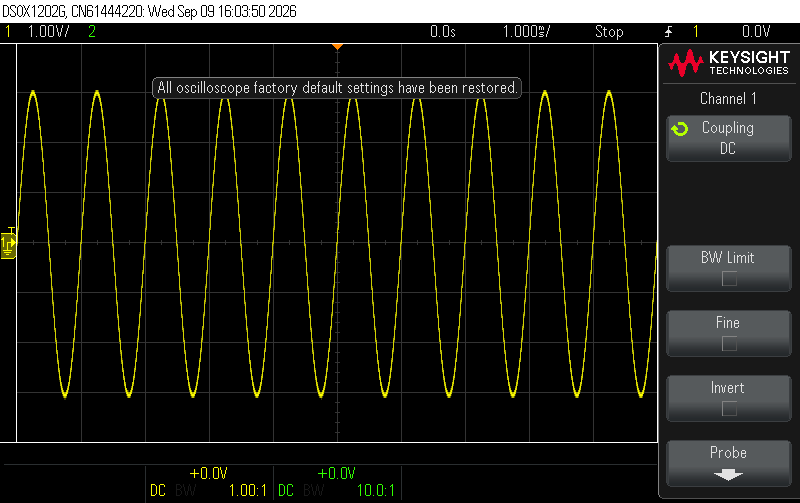
Sine Wave Output
The signal generator’s output was connected to channel 1 on an oscilloscope, with the time base and voltage range changed accordingly:
[3]:
scope.reset()
scope.set_timebase(timebase_range=10e-3)
scope.set_channel(channel=1, voltage_range=8.0, attenuation=1.0)
scope.set_trigger(channel=1, level=0.0, slope="POS", sweep="NORM")
scope.digitize()
Image(scope.get_screenshot())
[3]:
Square Wave with Output Impedance
[4]:
siggen.set_waveform_mode("SQUARE")
siggen.set_frequency(500)
siggen.set_impedance("HIGH")
siggen.set_voltage_amplitude(2.0)
siggen.set_voltage_offset(0.0)
siggen.set_channel_state(True)

print(f"Mode: {siggen.get_waveform_mode()}")
print(f"Output impedance: {siggen.get_impedance()} ohm")
Mode: SQUARE
Output impedance: HIGH ohm
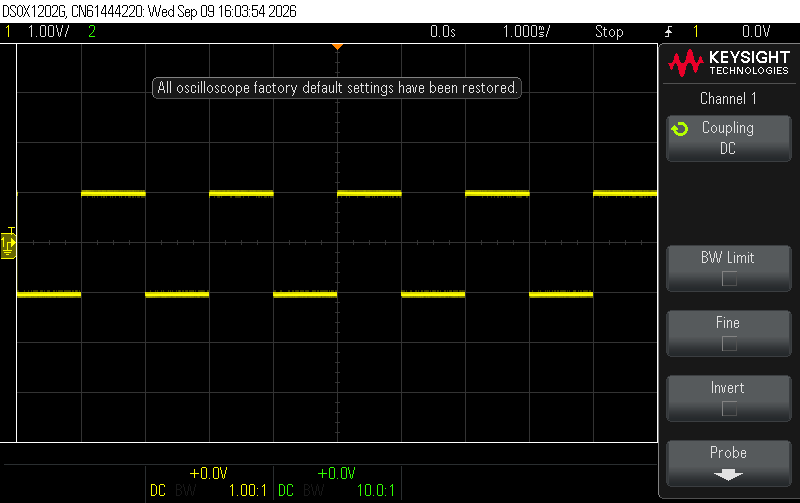
Square Wave Output
The signal generator’s output was connected to channel 1 on an oscilloscope, with the time base and voltage range changed accordingly:
[5]:
scope.reset()
scope.set_timebase(timebase_range=10e-3)
scope.set_channel(channel=1, voltage_range=8.0, attenuation=1.0)
scope.set_trigger(channel=1, level=0.0, slope="POS", sweep="NORM")
scope.digitize()
Image(scope.get_screenshot())
[5]:
Custom Waveform
[6]:
# Build a custom shape: values must be in [-1.0, 1.0]
t = np.arange(200) / 200
samples = 0.5 * (1 - np.cos(2 * np.pi * t)) * np.sin(2 * np.pi * 8 * t)

# Clean up the saved custom waveform from previous attempts
siggen.delete_saved_user_waveform("custom")

# Upload, save, set mode to USER and enable channel
siggen.set_new_arbitrary_waveform(samples, name="custom")
print(f"Saved waveforms: {siggen.get_saved_user_waveforms()}")

# Re-select if switching away and back
siggen.set_saved_user_waveform("custom")
siggen.set_frequency(200)
siggen.set_voltage_amplitude(4.0)
Saved waveforms: ['CUSTOM']
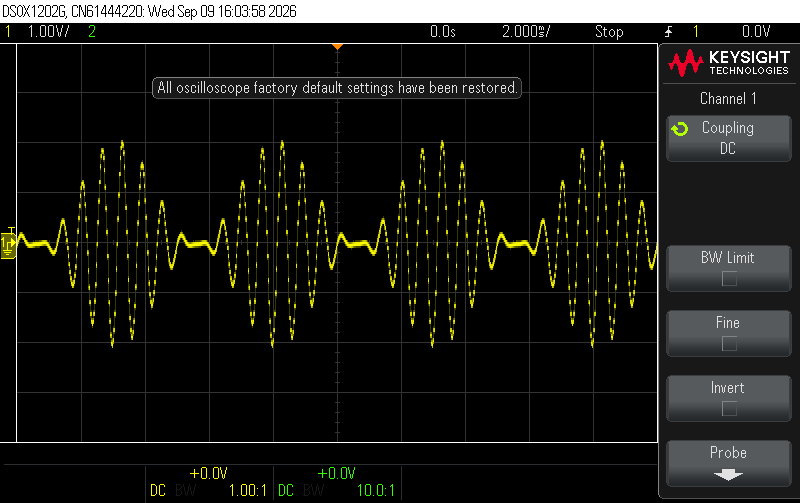
Custom Waveform Output
The signal generator’s output was connected to channel 1 on an oscilloscope, with the time base and voltage range changed accordingly:
[7]:
scope.reset()
scope.set_timebase(timebase_range=20e-3)
scope.set_channel(channel=1, voltage_range=8.0, attenuation=1.0)
scope.set_trigger(channel=1, level=0.0, slope="POS", sweep="NORM")
scope.digitize()
Image(scope.get_screenshot())
[7]:
[8]:
# Once finished, disconnect the instruments
siggen.disconnect()
scope.disconnect()